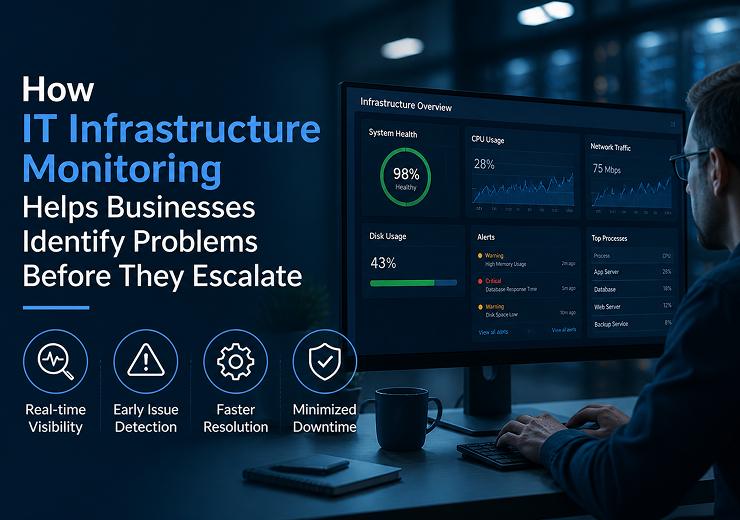
How IT Infrastructure Monitoring Helps Businesses Identify Problems Before They Escalate
Modern businesses depend on IT infrastructure for almost every part of their daily operations. Computers, servers, networks, cloud systems, applications and storage platforms all need to work reliably to keep employees productive and business processes running.
However, IT problems do not always happen suddenly. Many infrastructure failures begin with small warning signs such as increased server usage, low storage capacity, network delays, unusual device activity or repeated system errors.
If these warning signs are not identified early, they can develop into serious performance issues or complete system failures.
This is where IT Infrastructure Monitoring Services in Coimbatore can help businesses take a proactive approach to IT management.
IT infrastructure monitoring continuously observes important systems and provides visibility into their performance and health. By identifying potential problems before they escalate, businesses can reduce unexpected downtime, improve system reliability and respond to issues more efficiently.
What Is IT Infrastructure Monitoring?
IT infrastructure monitoring is the process of continuously observing the performance, availability and health of an organization’s IT systems.
Depending on the business environment, monitoring can cover:
- Servers
- Networks
- Computers and devices
- Storage systems
- Cloud infrastructure
- Applications
- System performance
- Backup status
Monitoring tools can identify unusual conditions and generate alerts when predefined thresholds or problems are detected.
The purpose is not simply to find failures after they happen. The goal is to identify early warning signs so IT teams can investigate and resolve issues before they significantly affect business operations.
Why Businesses Need IT Infrastructure Monitoring
Without proper monitoring, businesses may only discover IT problems when employees start experiencing them.
For example, a server with continuously increasing resource usage may eventually become slow or unavailable. Similarly, a network device showing repeated errors may eventually cause connectivity problems.
Monitoring provides businesses with better visibility into these conditions.
Early Problem Detection
IT teams can identify unusual performance or availability issues before they become major incidents.
Reduced Downtime
Early intervention can help prevent some infrastructure problems from turning into extended outages.
Better Performance
Monitoring helps businesses understand whether systems are performing within expected levels.
Faster Troubleshooting
Historical monitoring information can help technical teams understand what happened and where an issue started.
Improved IT Management
Continuous visibility makes it easier to manage infrastructure proactively instead of relying only on user complaints.
What Can IT Infrastructure Monitoring Track?
The exact monitoring requirements depend on the organization’s infrastructure.
Server Monitoring
Server monitoring can track areas such as:
- CPU usage
- Memory usage
- Storage capacity
- Server availability
- System performance
- Service status
If resource usage remains unusually high, IT teams can investigate before performance is significantly affected.
Network Monitoring
Network monitoring helps businesses understand the health and performance of their network infrastructure.
It can help identify:
- Connectivity issues
- Network availability
- Performance problems
- Device failures
- Unusual traffic patterns
- Repeated connection problems
Reliable network monitoring is particularly important for businesses that depend on internet connectivity and internal applications.
Storage Monitoring
Low storage capacity can affect servers, applications and business operations.
Monitoring can identify when storage is approaching capacity, allowing IT teams to:
- Remove unnecessary data
- Expand storage
- Move data
- Review storage usage
Taking action before storage becomes completely unavailable can prevent avoidable disruptions.
Cloud Infrastructure Monitoring
Businesses increasingly use cloud infrastructure for applications, storage and other IT requirements.
Cloud monitoring can provide visibility into:
- Resource usage
- System availability
- Performance
- Application dependencies
- Capacity requirements
Monitoring is especially useful as cloud environments grow more complex.
How Monitoring Identifies Problems Before They Escalate
The main value of infrastructure monitoring is its ability to identify patterns and warning signs.
Step 1: Continuous Monitoring
Systems are monitored regularly or continuously based on the monitoring setup.
Step 2: Detect Abnormal Conditions
Monitoring tools identify conditions that differ from expected performance.
Step 3: Generate Alerts
When a defined threshold or issue is detected, an alert can notify the responsible technical team.
Step 4: Investigate the Problem
The IT team reviews the alert and determines its potential cause and impact.
Step 5: Take Preventive Action
The issue can be addressed before it develops into a larger infrastructure failure.
This proactive cycle helps businesses move from reactive IT support to proactive IT management.
Common Problems That Monitoring Can Help Identify
High Server Resource Usage
A server consistently operating under heavy CPU or memory usage may indicate capacity or application-related problems.
Early investigation can help prevent serious performance degradation.
Network Performance Issues
Repeated connectivity problems or unusual network conditions can indicate a developing infrastructure issue.
Low Storage Capacity
Monitoring can alert IT teams before storage reaches critical levels.
Device Availability Problems
If an important network device or server becomes unavailable, monitoring can help identify the problem quickly.
Repeated System Errors
Repeated errors may indicate an underlying issue that needs investigation before it causes a larger failure.
Backup Problems
Monitoring backup status can help identify failed or incomplete backup processes before a recovery situation occurs.
IT Infrastructure Monitoring and Downtime Prevention
Monitoring is an important component of a broader downtime prevention strategy.
Businesses can combine monitoring with:
- Regular maintenance
- Hardware management
- Network management
- Server management
- Cyber security
- Backup and recovery
- Disaster recovery planning
Monitoring helps identify problems, while these other processes provide the actions needed to prevent or reduce their impact.
IT Monitoring and Cyber Security
Infrastructure monitoring can also support an organization’s wider cyber security strategy.
Unusual activity or unexpected changes in systems may require investigation.
However, infrastructure monitoring should not be considered a replacement for dedicated cyber security controls.
Businesses should combine monitoring with appropriate:
- Endpoint security
- Network security
- Access controls
- Authentication
- Software updates
- Backup and recovery
This creates a broader approach to protecting IT infrastructure.
IT Infrastructure Monitoring for Growing Businesses
As businesses grow, their IT environments become more complex.
A growing organization may add:
- More employees
- More devices
- Additional servers
- Cloud applications
- New office locations
- Increased network traffic
- Larger storage requirements
Manually checking every component becomes increasingly difficult.
IT Infrastructure Monitoring in Coimbatore can help businesses maintain visibility across their growing technology environment and identify potential problems more efficiently.
Benefits of IT Infrastructure Monitoring
- Early Issue Detection
Businesses can identify warning signs before they become major failures.
- Reduced Downtime
Proactive intervention can help reduce the likelihood and impact of infrastructure outages.
- Improved System Reliability
Regular monitoring provides better visibility into infrastructure health.
- Faster Troubleshooting
Technical teams can respond more efficiently when alerts and historical information are available.
- Better Capacity Planning
Performance information can help businesses understand when additional infrastructure may be required.
- Improved Employee Productivity
Reliable IT systems allow employees to access the tools and applications they need with fewer interruptions.
IT Infrastructure Monitoring vs Reactive IT Support
Proactive IT Monitoring | Reactive IT Support |
Identifies warning signs early | Responds after users report problems |
Continuous visibility | Limited visibility |
Focuses on prevention | Focuses on fixing failures |
Uses alerts and performance data | Depends heavily on reported incidents |
Helps reduce unexpected downtime | May involve emergency troubleshooting |
Supports long-term infrastructure planning | Mainly addresses immediate issues |
Reactive support remains necessary when incidents occur, but proactive monitoring can help reduce the number of serious incidents that reach the business.
How to Implement IT Infrastructure Monitoring
Businesses can follow a structured process when setting up infrastructure monitoring.
Step 1: Identify Critical Systems
Determine which servers, networks, applications and devices are essential to business operations.
Step 2: Define Monitoring Requirements
Decide which performance and availability indicators need to be monitored.
Step 3: Set Appropriate Alerts
Create alerts for important conditions such as high resource usage, low storage or system unavailability.
Step 4: Establish Response Procedures
Define who receives alerts and what actions should be taken.
Step 5: Review Monitoring Data
Use performance information to identify recurring problems and infrastructure trends.
Step 6: Improve the Infrastructure
Use monitoring insights to plan maintenance, upgrades, capacity improvements and security measures.
How to Choose an IT Monitoring Company in Coimbatore
When selecting an IT Monitoring Company in Coimbatore, businesses should evaluate the provider’s technical expertise and monitoring capabilities.
Monitoring Coverage
Check whether the provider can monitor servers, networks, cloud infrastructure and other important systems.
Alert Management
Understand how alerts are generated, prioritized and handled.
Technical Support
Monitoring is most valuable when technical teams can respond quickly to identified problems.
Security Capabilities
The provider should understand how monitoring works alongside cyber security and network security.
Scalability
The monitoring solution should support additional devices, systems and locations as the business grows.
Reporting
Regular reports can help businesses understand infrastructure performance and recurring issues.
IT Infrastructure Monitoring Services by Virtual Automation
Virtual Automation provides business-focused IT solutions covering areas such as IT Infrastructure Management, Network Monitoring, Cloud Services, Cyber Security, Backup & Recovery and Technical Support.
Businesses can consider professional support for:
- IT Infrastructure Monitoring
- Network Monitoring
- Server Monitoring
- Cloud Infrastructure
- IT Infrastructure Management
- Cyber Security
- Backup & Recovery
- Technical Support
By combining monitoring with infrastructure management, businesses can take a more proactive approach to IT reliability and business continuity.
Industries That Can Benefit from IT Infrastructure Monitoring
Manufacturing
Monitoring can help maintain the reliability of IT systems supporting business and operational activities.
Healthcare
Reliable IT infrastructure is important for organizations that depend on digital systems and connectivity.
Education
Monitoring can support networks, computers, servers and applications used by educational organizations.
Retail
Businesses can monitor systems supporting day-to-day operations and business applications.
Logistics
Monitoring can help maintain reliable connectivity and technology infrastructure for operational processes.
Corporate Offices
Monitoring can provide visibility across employee devices, networks, servers and cloud services.
Small & Medium Businesses
Professional monitoring can help smaller organizations maintain IT visibility without requiring a large internal technical team.
Why Choose Virtual Automation?
Effective infrastructure monitoring requires more than simply receiving technical alerts. Businesses need an IT partner that can understand the wider infrastructure and respond to identified issues.
Virtual Automation provides capabilities across:
- IT Infrastructure Management
- Network Monitoring
- Cloud Services
- Cyber Security
- Backup & Recovery
- Managed IT Services
- Technical Support
This broader approach allows businesses to connect infrastructure monitoring with their overall IT management and security requirements.
Conclusion
IT infrastructure problems often begin with small warning signs. A gradual increase in server usage, declining storage capacity, repeated network errors or unusual system behaviour may indicate a larger issue developing in the background.
Without monitoring, businesses may only discover these problems after employees or customers are already affected.
IT Infrastructure Monitoring Services in Coimbatore can help businesses identify potential issues earlier, improve infrastructure visibility and support proactive IT management.
When monitoring is combined with regular maintenance, network management, cyber security, backup and recovery, businesses can build a more reliable IT environment and reduce the risk of unexpected disruptions.
The goal is not simply to respond faster when something fails, but to identify potential problems early and take action before they escalate.